


We're pleased to announce that Ruleguard version 4.117.0 is now live!
This update contains the following changes:
Custom Documents
- Rename a custom document. On the document’s Summary tab, users who can edit documents can now change its name. The new name shows on the document card, the Custom documents list, the live view and every new version, including the downloaded file name.
- Choose the firm name a custom document shows. On the same tab you can enter a firm name for the document, up to 200 characters. It then appears in the heading and footer of the live view and of every new version. Leave it blank, or reset it, to use your account name as before. Copying a document copies its firm name.
MI
- Report on enforced evidence for events. MI cards on events have two new columns, Enforce general evidence and Enforce subject evidence. You can show them, group by them and filter on them, so a card can tell apart an event where evidence is expected from one that cannot be completed without it.
Improvements
- Put selected firms in your own order. On a linked item field of type Firm set to Selected firms, administrators can drag the firms into the order they want. People filling in the record see the firms in that order. Existing fields keep their current order until someone changes it.
- "Last login" in MI. In MI, the Users field Current login date is now called Last login, to match Admin > Users & Permissions. Values are unchanged, and existing cards and dashboards keep working.
- Card view remembers your rows per page. The number of rows you choose in a card view grid is now remembered for that grid. The largest size offered is now 50.
Fixes
- Rule description on Matrices. When a 'Super Matrix' includes the Rules relationship, the Rule description column now shows each linked Rule's description, on screen and in the download.
- Rule hierarchy in Rules downloads. The Include rule hierarchy option on the Rules download now takes effect: the hierarchy is included when it is on and left out when it is off.
- MI date filters. A date range ending Today now moves forward each day instead of staying at the date the filter was set. Year to date no longer includes future dates.
- Previous responses in workflows. A line manager approving a direct report's step in a workflow that uses previous responses no longer sees a permission error when opening the previous response.
- Data library tables. A row in a data library table that is named after another data library item now saves correctly. When you upload a CSV, a value that cannot be matched is flagged with the reason, for example that no item has that name or that more than one does, instead of being left blank. Set-up problems now show a clear message.
- New child items on stage workflow cards. Choosing New on a stage workflow card now creates the item as a child of that card, so it appears in the card's child items rather than as a linked item.
- Rule updates. A removal date written day-first is now always read correctly when Rule updates are generated. A problem with one subscription no longer stops updates being generated for the others.
In a Rush?
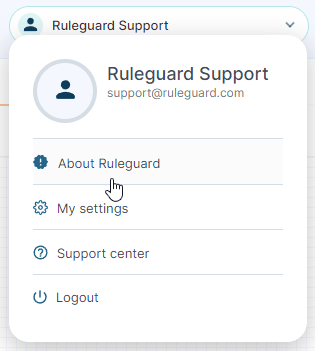
If you don't have time to read our blog posts right away, you can access all release notes at any time by clicking the release version number in the Ruleguard Welcome menu (top right).
If you encounter any problems or have any questions about this update, please let us know at support@ruleguard.com or contact your Customer Success Manager.
Ruleguard Team