


We're pleased to announce that Ruleguard version 4.112.0 is now live!
This update contains the following changes:
MI - Faster performance
- Improved the technical implementation for much faster loading.
- Note you may see on Dashboards an 'As at time' in its bottom-right corner where it's been revisited within the hour.
- A refresh icon next to the 'As at time' reloads that card.
- The card menu still offers Refresh, and a new Refresh button in the dashboard toolbar, just before Export, reloads every card.
- The active tag filter now shows the tags themselves, in their own colours, on the MI Reports and Dashboards lists and on mapping screen headers.
- New dashboards and reports pick up the active tag filter. For example, a dashboard created inside a Solution's MI is tagged to that Solution automatically, so it stays in the list you're working in.
Regulatory Change (MI)
- Regulatory Change Update tasks are now a measure of their own in MI 2, so you can report on the tasks directly instead of going through the updates. The measure includes Task Owner, Shared With, Alert List, task name, the parent Regulatory Change Update, description, and configuration i.e. whether task emails and overdue reminders are switched on.
- Filter those tasks to the logged-in user, as you already can for Issues, so a personal dashboard can show "my open tasks". (This works on the new measure too).
Staged Workflows - Linked item improvements
- Better representation of Linked Items (staged workflow type links).
- An item's summary now shows the items that link to it grouped by its type in the same way as its own linked items meaning bi-directional links are clearer 'from both sides'.
- The list is read-only. A link can still be changed or removed only from the item that owns it.
- Note: Permissions are still respected. If you cannot view the linking item, nothing about it - name, ID or type - appears.
- Linked items and child items are now coloured by their type, including Risk, Process and Control, so they are easier to tell apart.
- Clicking a linked item opens its own page where its type has one (Solution, Form, People form, Testing, Plan, Assessment).
- Other types open in the detail pop-out as before.
Improvements & Fixes
- Data Library values load in dropdowns without a separate Permission. If you can see a form, you can now see the Data Library values offered in its Data library item fields (fields define the Data Libraries that may be selected from to ensure control).
- Easier filtering on multi-user fields. Where a multiple-selection Users field already has users or User Groups selected, the grid search now offers them as a dropdown to filter by.
- MI 2 cards keep their chart settings when saved without a preview. Saving a card without first clicking Generate preview could lose its chart type, sort order, labels and colours. Save card and Update card now build the preview first and then save.
- Filtering MI on Scheduling enabled could include archived tasks whose scheduling showed as switched off in the Matrix. MI 2 now works this out in the same way as the Matrix, so those tasks are no longer included.
- With Show all Individual Tasks switched on, the filter used to highlight matching text but still show every task. It now shows only tasks that belong to the matching Task List.
- A Custom Field no longer keeps the calculation setting after its type is changed. If you ticked the calculation option on a type that supports it, then changed the field to a type that does not (for example, Rich text), the field was created with the calculation setting still on.
- In rare cases a Person could appear to report to themselves, or a report could be missing from one of their Job Roles. This should no longer be possible; an error will be shown instead.
- Changing a Person's Role Type no longer fails with a Controlled Function error caused by a flag that should not have been set.
In a Rush?
If you don’t have time to read our blog posts right away, you can access all release notes at any time by clicking the release version number in the Ruleguard Welcome menu (top right).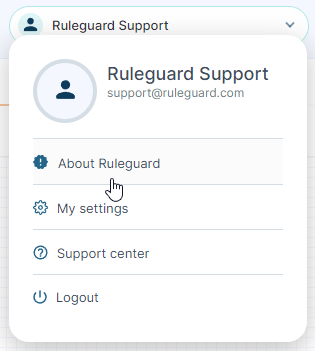
If you encounter any problems or have any questions about this update, please let us know at support@ruleguard.com or contact your Customer Success Manager.
Ruleguard Team